

| BIG > Download Algorithms > Daniel Sage > MIJ |
| CONTENTS |
DOWNLOAD
MIJ offers the missing link between two imaging software: ImageJ/Fiji and Matlab. The goal of the package mij.jar is to provide static methods to exchange images and volumes. MIJ allows also to access to all built-in functions of ImageJ and to third-part plugins of ImageJ. MIJ is integrated in Fiji with a super-easy script to use it.
Thanks to the Fiji team, MIJ is now super-easy to use using a Matlab script Miji.m which is integrated in Fiji. ImageJ/Fiji becomes a image-processing librairie of Matlab.
Daniel Sage, Dimiter Prodanov, Jean-Yves Tinevez and Johannes Schindelin, MIJ: Making Interoperability Between ImageJ and Matlab Possible ImageJ User & Developer Conference, 24-26 October 2012, Luxembourg. Poster [PDF, 1.9 Mb]
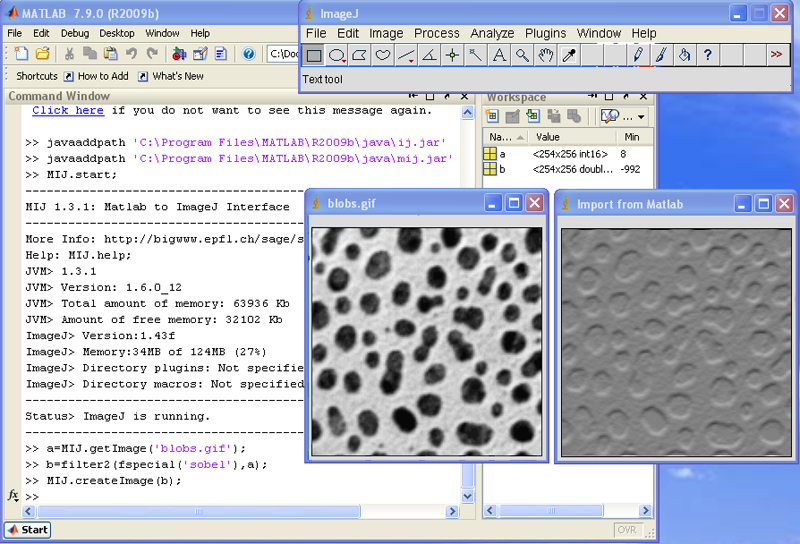
Some interesting features
Matlab prerequirements
The package requires a proper installation of ImageJ and Matlab. The package was tested since Matlab 7.9.0 (R2009b) on different plateforms a Windows XP, Mac OSX 10.6, and Linux Ubuntu.
Download and install
Download mij.jar and place it into the java directory of Matlab (e.g for Window Machine 'C:\Program Files\MATLAB\R2009b\java\'). Copy also the ij.jar of ImageJ in the java directory of Matlab.
Set up the path (with a ImageJ already installed and configured):
Set up the paths (without any ImageJ yet installed):
Set up the memory:
Source Code and Documentation
Supported methods in the version 1.3.9
| Method | Description |
| MIJ.closeAllWindows | Close all windows |
| MIJ.createColor | exports RGB image |
| MIJ.createImage | exports other images |
| MIJ.error | display a error message in a dialog box |
| MIJ.exit | exists MIJ |
| MIJ.getCurrentImage | returns a 2D array representing the current image |
| MIJ.getImage | returns a 2D array representing the image specified by the title |
| MIJ.getColumn | imports column of the ResultsTable |
| MIJ.getCurrentTitle | imports the title of the current image |
| MIJ.getHistogram | imports the histogram of the current image |
| MIJ.getLog | returns the contents of the window log of ImageJ |
| MIJ.getListImages | returns the list of opened images |
| MIJ.getListColumns | returns the list of columns currently used in the ResultsTable |
| MIJ.getResultsTable | imports the ResultsTable |
| MIJ.getRoi | imports the current ROI |
| MIJ.help | gives a brief description of the MIJ methods |
| MIJ.log | print a message in the window console of ImageJ |
| MIJ.selectWindow | select a window |
| MIJ.setRoi | exports the current ROI |
| MIJ.setColumn | exports contents to a column in the ResultsTable |
| MIJ.setSlice | set the slice of a stack of image |
| MIJ.setThreshold | sets the threshods of the image |
| MIJ.setupExt | points to the folder containing ij.jar and plugins and macros folder |
| MIJ.showStatus | display a message in the status bar of ImageJ |
| MIJ.start | starts MIJ |
| MIJ.run | runs command or macro |
| MIJ.version | return the MIJ version |
Mapping the Matlab numeric type to ImageJ type
| Matlab | ImageJ image type |
| uint8 | Grayscale 8-bit |
| int8 | Grayscale 8-bit |
| uint16 | Grayscale 16-bit |
| int16 | Grayscale 16-bit |
| uint32 | Grayscale 16-bit (Possible loss of precision) |
| int32 | Grayscale 16-bit (Possible loss of precision) |
| uint64 | Not allowed |
| int64 | Not allowed |
| single | Grayscale 32-bit |
| double | Grayscale 32-bit (Possible loss of precision) |
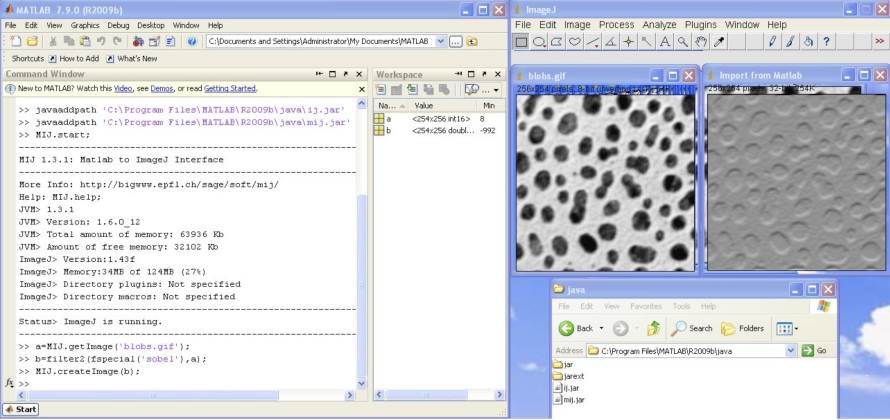
Using fast Matlab routines and display resulting images on ImageJ
Reading image files using Bio-Formats on Matlab
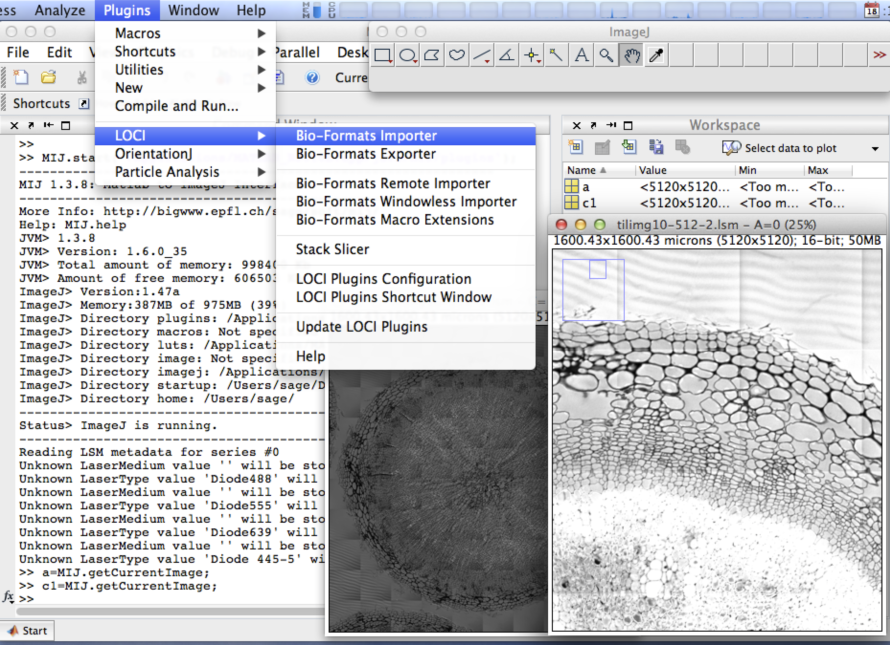
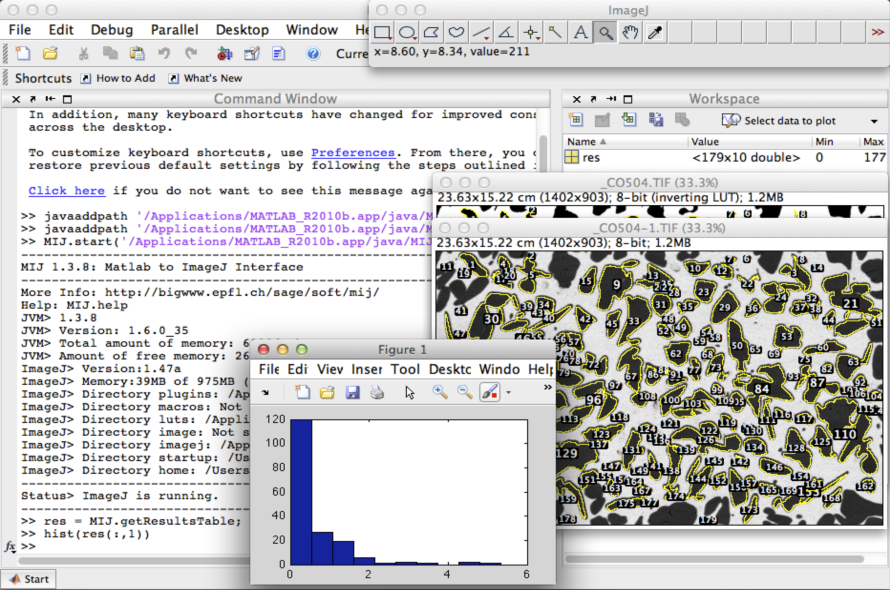
Image-analysis on ImageJ, statistics on Matlab
You'll be free to use this software for research purposes, but you must not transmit and distribute it without our consent. In addition, you undertake to include a citation whenever you present or publish results that are based on it. EPFL makes no warranties of any kind on this software and shall in no event be liable for damages of any kind in connection with the use and exploitation of this technology.
daniel.sage@epfl.ch • 09.11.2018